

In a digital-first world, your website is more than just an online address it’s your brand’s identity, sales platform, and customer service hub. The way it looks, feels, and responds can make or break a visitor’s impression. That’s where web designing steps in.
Web designing isn’t just about choosing colours or adding flashy graphics. It involves a delicate balance of user experience, functionality, mobile responsiveness, SEO integration, and aesthetic appeal. Whether you’re a business owner, digital marketer, freelancer, or developer, understanding the core of web designing is crucial to staying competitive.
Let’s break down what web designing entails, explore its modern trends, highlight its tools, and help you learn how to create websites that don’t just exist they perform.
What is Web Designing?
Web designing refers to the process of planning, conceptualising, and arranging content for websites. It involves everything from the structure and layout to the colours, fonts, graphics, and interactive features.
At its core, web designing is about crafting a seamless and intuitive experience for the user whether they’re reading a blog, shopping online, or signing up for a service.
Key Components of Web Design:
- Layout: How elements are arranged on a page.
- Typography: The style, appearance, and readability of text.
- Navigation: Menus, buttons, and links that guide user movement.
- Responsiveness: Mobile and tablet-friendly designs.
- Visual Hierarchy: The order in which elements are perceived.
- User Interface (UI): How users interact with elements.
- User Experience (UX): Overall usability and satisfaction.
- Performance: Site speed, load times, and smooth transitions.
Importance of Web Designing in 2025
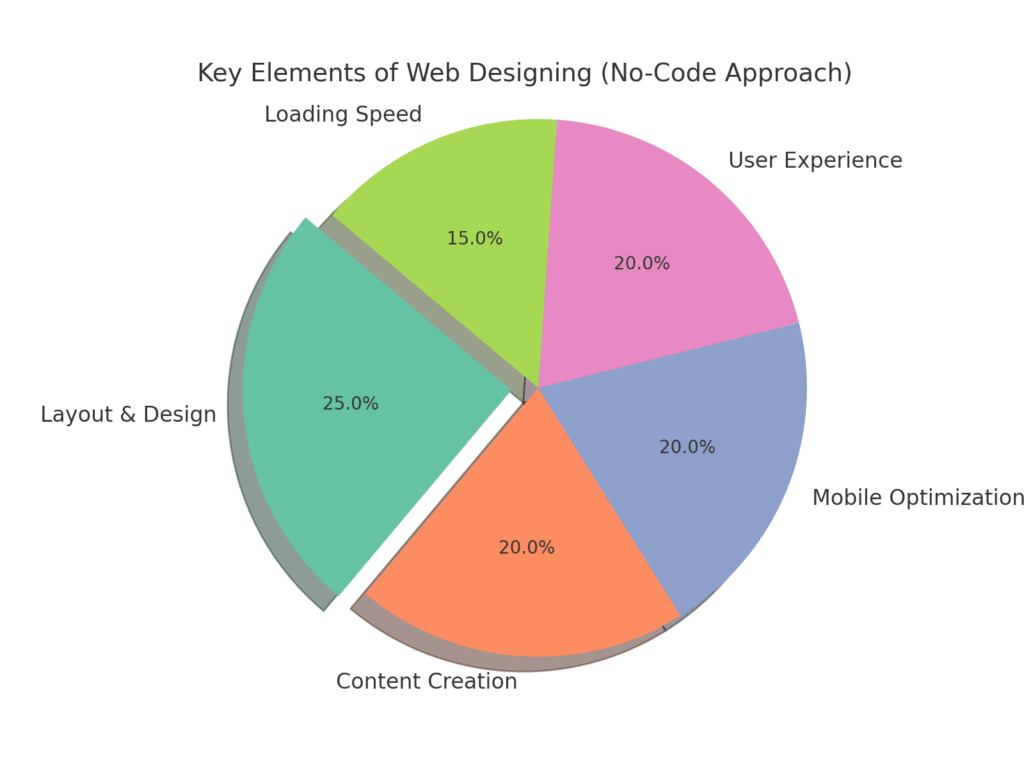
Web design in 2025 is no longer just about pretty pages. It’s a growth tool. Here’s why it’s more important than ever:
1. First Impressions Count
Users form opinions about your site within 0.05 seconds. A well-designed homepage can turn a visitor into a buyer instantly.
2. Mobile-First is the Norm
With mobile usage surpassing desktop, responsive design isn’t optional it’s essential.
3. SEO Integration
Clean coding, fast loading times, and mobile responsiveness all contribute to better rankings on Google.
4. User Trust
Professional-looking sites are perceived as more trustworthy. Poor design can lead to high bounce rates.
5. Better Conversions
Strategic design improves navigation, CTA placements, and funnel flows all boosting conversions.
Types of Web Design
There are several approaches to building websites today, each suitable for different goals:
1. Static Web Design
These websites are fixed and do not change content unless manually updated. Best for portfolio sites or simple company pages.
2. Dynamic Web Design
Content changes based on user interaction or data. Common in blogs, e-commerce, and forums.
3. Responsive Web Design
Design adapts to screen sizes mobile, tablet, or desktop. Essential for modern browsing.
4. Adaptive Web Design
Different versions of the website load based on the device type, offering tailored layouts.
5. Single Page Design
All content fits on one long scrollable page. Great for portfolios or promotional campaigns.
Tools Every Web Designer Should Know
Modern web designers rely on a combination of tools to bring their visions to life. Here are some must-haves:
Design & Wireframing:
- Figma – Cloud-based design and prototyping.
- Adobe XD – Great for UI/UX workflows.
- Sketch – Ideal for macOS users.
Development Platforms:
- WordPress – Flexible CMS powering over 40% of websites.
- Webflow – Design visually with backend control.
- Wix & Squarespace – Drag-and-drop website builders.
Code Editors:
- VS Code – Lightweight and powerful.
- Sublime Text – Speedy with rich plugin support.
Graphics:
- Canva – Quick graphics creation.
- Adobe Illustrator & Photoshop – Professional graphic design.
Essential Skills for Web Designers in 2025
To thrive in the field of web designing, professionals need both creative and technical expertise:
1. HTML/CSS
These are the building blocks of websites. HTML structures the content, and CSS styles it.
2. JavaScript
Brings interactivity think sliders, pop-ups, and dynamic forms.
3. Responsive Design Principles
Design should look good and function well on all screen sizes.
4. UX/UI Design
Creating layouts that are intuitive and visually pleasing.
5. SEO Best Practices
Web designers must understand how structure, code, and speed impact search visibility.
6. Design Thinking
Problem-solving with a user-first mindset.
Web Design Trends to Watch in 2025
The web is always evolving, and so are design trends. Here’s what’s shaping the web design landscape this year:
1. Dark Mode Everywhere
Reduces eye strain and gives websites a modern, sleek look.
2. 3D and Micro-Interactions
Subtle animations make the site feel alive and guide user behaviour.
3. Glassmorphism
A blurred-glass effect that adds depth and elegance.
4. Minimalism and Maximalism
Either super clean or bold and colourful no in-between!
5. AI-Driven Personalisation
Web pages that adapt to individual user behaviours in real time.
Steps to Designing a High-Performing Website
Here’s a simplified web design process to ensure results:
1. Understand the Goal
What’s the purpose sales, information, lead generation, branding?
2. Know Your Audience
Designing for teens? Corporate clients? Your visual and language choices must align.
3. Plan the Structure
Use wireframes and sitemaps to define layouts and flow.
4. Create a Prototype
Use Figma or Adobe XD to visualise the design before coding.
5. Develop the Site
Translate design into code using HTML/CSS/JS or platforms like Webflow.
6. Test, Optimise, Launch
Check speed, responsiveness, and usability across devices before going live.
SEO in Web Design: Don’t Ignore It
A beautiful website is useless if no one finds it. SEO must be part of the design phase.
On-Page SEO Elements in Web Design:
- Clean code structure
- Fast loading times
- Mobile-friendliness
- Alt text on images
- Schema markup
- Internal linking
Integrating SEO while designing can drastically improve your organic visibility and traffic.
Common Web Design Mistakes to Avoid
Many websites lose traffic and users because of avoidable design errors. Here are a few to watch out for:
- Cluttered layouts
- Slow load speeds
- Poor mobile responsiveness
- Inconsistent fonts and colours
- Hard-to-find navigation
- Lack of clear calls-to-action (CTAs)
- Ignoring accessibility features (like screen reader compatibility)
Accessibility in Web Design
Designing with inclusivity in mind is no longer optional. Websites should be usable by people with disabilities.
Accessibility Features:
- Keyboard navigation
- Alt text for images
- High contrast mode
- Captioned videos
- Screen reader compatibility
- Clear font sizes and headings
Following WCAG guidelines helps you make a more inclusive web and also enhances SEO.
Freelance Web Designer vs Web Design Agency
If you’re a business looking to get a website designed, you might wonder who to hire.
Freelancers
- Cost-effective
- Personalised approach
- Flexible hours
Agencies
- Full team support
- Faster turnaround
- Often includes SEO, branding, and marketing
Choose based on your budget, project size, and timeline.
Career Opportunities in Web Designing
The demand for web designers is only growing. Here are popular roles in this space:
- UI/UX Designer
- Front-End Developer
- Graphic Web Designer
- WordPress Developer
- Webflow Specialist
- Creative Director
- Design Consultant
Freelancing, remote work, and agency jobs are all widely available.
Also read: 7 Proven Digital Marketing Benefits (Beginners)
Future of Web Designing
With AI, AR, and voice search becoming mainstream, the scope of web design is expanding. Expect voice-activated interfaces, augmented browsing, and more personalised experiences based on user data.
However, human creativity remains irreplaceable. Tools can automate layout, but only designers can infuse emotion, purpose, and beauty into a digital interface.
Final Thoughts: Web Designing is More Than Pixels
Web designing in 2025 is a rich blend of aesthetics, logic, user psychology, and strategic marketing. Whether you’re building your personal portfolio or crafting a full-scale business site, design is what brings your digital vision to life.
If your website isn’t getting clicks, converting visitors, or showing up in searches, it might be time to rethink your design. Keep the user journey at the centre, stay updated with trends, and never stop testing. After all, the web isn’t static and your design shouldn’t be either.
Want to Learn Web Designing?
Start with:
- Free YouTube tutorials
- Courses on Coursera, Udemy, or Skillshare
- Practicing on platforms like Webflow or WordPress
Design your future one pixel at a time.


One thought on “How to Master Web Designing Without Coding in 10 Days (Newbie)”